
Self-service · Excel workbook
Build a revenue forecast you know when to trust.
Turn your subscriber history into a 12-month revenue forecast with visible assumptions, three planning scenarios, and clear signals about how much evidence supports the result.
$99 One-time purchase
Readiness and Confidence
What it does
A forecast that shows its work.
One or two subscription plans. A workbook you run yourself.
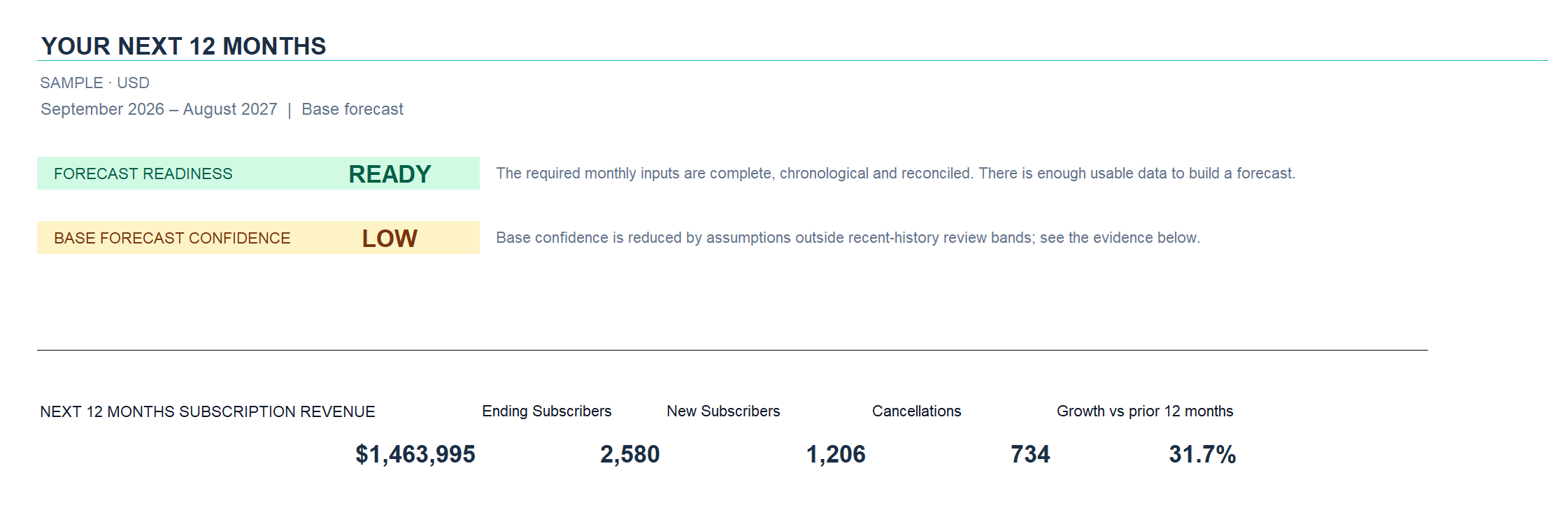
Forecast Readiness checks whether your inputs support building the model. Forecast Confidence considers the evidence behind the Base forecast, including historical validation, your assumptions, and lifecycle history.
The assumptions and logic stay in the workbook, so you can review them, update them, and share the forecast with your team.
How it works
From your history to a forecast you can review
-
01
Add your history.
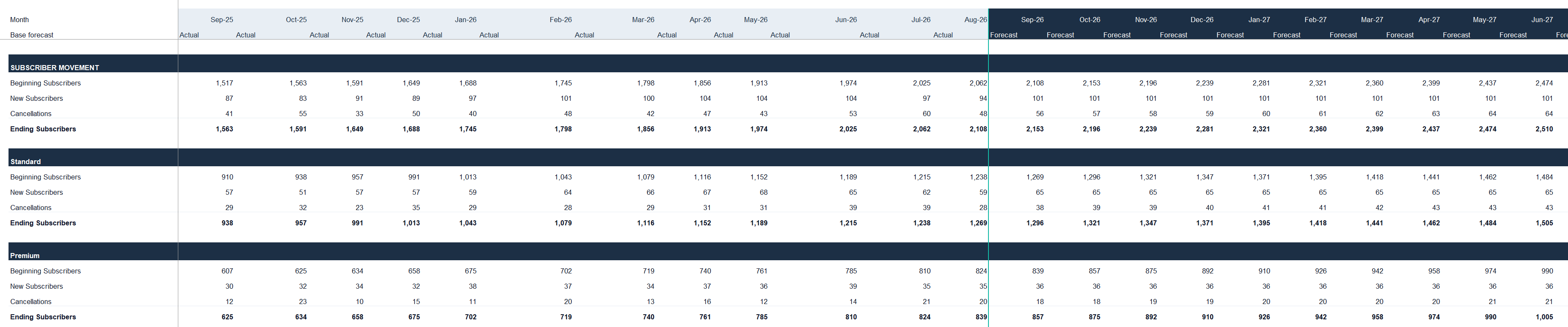
Paste at least six complete months of monthly subscriber and subscription-revenue actuals.
-
02
Set your assumptions.
Review pricing, introductory offers, acquisition growth, and retention assumptions.
-
03
Review the forecast.
Compare the next 12 months and scenarios, then check Readiness and Confidence alongside the results.
One product
Two ways to use the same template
Start with the history you already have. Add subscriber-level detail when you have it.
- Basic Forecast
- Start with monthly subscriber totals and subscription revenue. The workbook estimates lifecycle behavior from that aggregate history.
- Enhanced Lifecycle Forecast
- Add subscriber signup and cancellation history to measure retention and churn by subscriber age and around the supported transition from introductory to regular pricing.
Both options are included in the same workbook at the same price. Subscriber History is optional; Basic Forecast works without it.
Forecast Confidence
Know what supports your forecast.
A forecast can be Ready and still have Low Confidence.
Outputs and scenarios
See the next 12 months from more than one angle.
Compare Base, Upside, and Downside by changing acquisition and churn assumptions. These are planning scenarios, not probability estimates.
- Monthly projections for the next 12 months, calendar-quarter rollups, and a next-12-month total.
- Subscriber movement and subscription revenue by plan.
- Base, Upside and Downside planning scenarios using editable acquisition and churn multipliers.

Fit
Check the fit before you buy
The inputs and environment
- For subscription and recurring-revenue businesses. One or two subscription plans.
- At least 6 complete months of monthly history; 12+ months recommended.
- Subscriber History is optional.
- The template has been tested in Windows desktop Excel with automatic calculation enabled.
- Excel for Mac and Google Sheets have not been tested, so we do not currently claim compatibility with them.
- Enhanced Lifecycle Forecast supports up to 50,000 subscriber records. Larger files may work but are not currently supported.
Required monthly actuals
- Month
- Plan
- Beginning Subscribers
- New Subscribers
- Cancellations
- Ending Subscribers
- Subscription Revenue
Optional Subscriber History
- Subscriber ID
- Signup Date
- Cancellation Date
- Plan
Supported pricing structure
One introductory pricing period, followed by regular pricing, for one or two subscription plans.
What the template does not model
- More than two plans in the same model
- Upgrades/downgrades between plans
- Pauses
- Reactivations/winbacks
- Usage-based pricing
- Overlapping subscriptions
- Multiple introductory pricing phases
- Pricing changes during the 12-month forecast
If the forecast you need requires these mechanics, explore a Custom Revenue Forecast. Its scope is agreed separately.
Other outputs outside the template’s scope
- CAC
- Costs
- Profitability
- Cash flow
- Valuation
Scope
What's included, and what isn't
Included
- The working template workbook, ready for your own data
- A sample workbook populated with fictional data
- Built-in START HERE instructions in both workbooks
- Bug-fix support on the template itself
Not included
- Custom setup for your business
- Data cleanup or preparation
- Business-specific customization of the model
- Consulting or review of your forecast and assumptions
- Ongoing operation of the model or recurring refreshes
Product support covers defects in the template. It does not include customization, data preparation, consulting or review of your business forecast.
Questions
Before you buy
What history do I need?
Start with at least six complete months of monthly actuals; 12 or more months is recommended.
You'll need Month, Plan, Beginning Subscribers, New Subscribers, Cancellations, Ending Subscribers, and Subscription Revenue. Subscriber-level records are optional—Basic Forecast works with monthly history alone.
What does optional Subscriber History add?
Subscriber History lets the workbook measure retention and churn by subscriber age and around the supported introductory-to-regular pricing transition, rather than relying only on estimates from monthly totals.
Provide Subscriber ID, Signup Date, Cancellation Date, and Plan. Enhanced Lifecycle Forecast supports up to 50,000 subscriber records; larger files may work but are not currently supported.
Both forecasting modes are included in the same purchase. There is no separate upgrade to buy.
Which spreadsheet software can I use?
The template has been tested in Windows desktop Excel with automatic calculation enabled.
Excel for Mac and Google Sheets have not been tested, so we do not currently claim compatibility with them.
How does the template calculate monthly revenue?
For each month, the template counts subscription revenue from subscribers active at month end, with no daily proration. A subscriber who cancels during the month contributes no modeled subscription revenue for that month.
This is the workbook's forecasting convention, not a statement about what you billed or collected. Results may differ from cash receipts or accounting revenue, so check that this convention suits the forecast you need.
What does the template support?
It forecasts the next 12 months for one or two subscription plans, with one introductory pricing period followed by regular pricing.
You can compare Base, Upside, and Downside scenarios using editable acquisition and churn multipliers. These are planning scenarios, not probabilities.
The template is not a general financial model. See Check the fit before you buy above for the full list of unsupported subscription mechanics and financial outputs.
Does READY mean my forecast is accurate?
No. READY means your inputs meet the workbook's requirements for building a forecast.
Forecast Confidence considers the evidence supporting the Base forecast. You can have enough data to run the model and still have limited evidence behind the result. Neither Readiness nor Confidence guarantees future accuracy.
What if the readiness assessment says NOT READY?
Start with the reasons shown in your result. You may need more history, more consistent inputs, or a different model.
If you have fewer than six complete months of history, you’ll need more history before using this template. If the issue is conflicting definitions or unreconciled numbers, Greenlight may help establish the foundation. If the forecast needs mechanics the template does not support, a Custom Revenue Forecast may be a better fit.
A NOT READY result does not automatically mean you need a paid service.
Can you build a forecast around my business?
Yes. Custom Revenue Forecast is a separately scoped service for a model built around your pricing, plans, and subscriber lifecycle.
If the issue is inconsistent revenue numbers or customer definitions, Greenlight helps establish the foundation first. We build and document the custom model, then hand it over for your team to run.
Custom setup, data preparation, and forecast review are not included in the template purchase. Tell us what you need, and we'll help you work out the right starting point.
Build your next 12-month revenue forecast.
Get the working template and fictional sample workbooks, both with built-in START HERE instructions, in one purchase.